1、配置 1.1、POM
springboot版本:2.6.6
特别要注意jar包的版本,如果跑不起来,基本上都是版本问题
1 2 3 4 5 6 7 8 9 10 11 12 13 14 15 16 <dependency > <groupId > net.oschina.j2cache</groupId > <artifactId > j2cache-spring-boot2-starter</artifactId > <version > 2.8.0-release</version > </dependency > <dependency > <groupId > net.oschina.j2cache</groupId > <artifactId > j2cache-core</artifactId > <version > 2.8.0-release</version > </dependency > <dependency > <groupId > redis.clients</groupId > <artifactId > jedis</artifactId > <version > 3.7.1</version > </dependency >
1.2、配置文件 1.2.1、application.properties 1 2 spring.profiles.active =test
1.2.2、application-test.properties
注意J2cache配置文件位置
redis客户端类型:可以选择 lettuce和jedis:
net.oschina.j2cache.autoconfigure.J2CacheSpringRedisAutoConfiguration默认使用lettuce
lettuce底层使用Netty框架,性能好
较低版本的将j2cache使用的jedis客户端
二级缓存序列化格式,采用了线上的fst,测试的时候可以试试使用fastjson,这样可以在redis中看到存储对象中的内容。net.oschina.j2cache.util.SerializationUtils中支持一下几种序列化:
fst:org.nustaq.serialization.FSTConfiguration,效率貌似较高,线上使用中。
kryo:com.esotericsoftware.kryo.io.Input、com.esotericsoftware.kryo.io.Output
json:org.nustaq.serialization.FSTConfiguration,使用 FST 的 JSON 对象序列化
fastjson:com.alibaba.fastjson.JSON
java:标准的 Java 序列化,使用ObjectOutputStream、ObjectInputStream
1 2 3 4 5 6 7 8 9 10 11 12 13 14 15 16 17 18 19 20 j2cache.config-location =classpath:j2cache/j2cache-${spring.profiles.active}.properties j2cache.open-spring-cache =true j2cache.allow-null-values =true j2cache.l2-cache-open =true j2cache.redis-client =jedis j2cache.cache-clean-mode =active j2cache.j2CacheConfig.serialization =fst spring.cache.type =GENERIC
1.2.3、j2cache/j2cache-test.properties
一级缓存可以选择caffeine或者ehcache
j2cache目前仅支持配置设置最多缓存对象数量及过期时间
EhCache 是一个纯 Java 的进程内缓存框架,具有快速、精干等特点,是 Hibernate 中默认的 CacheProvider。
EhCache 2.x与EhCache 3.x
目前线上使用EhCache 2.x,需配置ehcache.xml使用
注意Redis连接配置。
1 2 3 4 5 6 7 8 9 10 11 12 13 14 15 16 17 18 19 20 21 22 23 24 25 26 27 28 29 30 31 32 33 34 35 36 37 38 39 40 41 42 43 44 45 46 47 48 49 50 51 52 53 54 55 56 57 58 59 60 61 62 63 64 65 66 67 68 69 70 71 72 73 74 75 76 77 78 79 80 81 82 83 84 85 86 87 88 89 90 91 92 93 94 95 96 j2cache.L1.provider_class = ehcache j2cache.L2.provider_class = net.oschina.j2cache.cache.support.redis.SpringRedisProvider j2cache.L2.config_section = redis j2cache.sync_ttl_to_redis = true j2cache.broadcast = net.oschina.j2cache.cache.support.redis.SpringRedisPubSubPolicy j2cache.default_cache_null_object = true j2cache.serialization = ${j2cache.j2CacheConfig.serialization} ehcache.configXml =/ehcache.xml redis.mode = single redis.storage = generic redis.channel = j2cache redis.namespace = myJ2Cache redis.hosts = 192.168.0.10:6379 redis.timeout = 2000 redis.password = xxxxxx redis.database = 10 redis.ssl = false redis.maxTotal = 100 redis.maxIdle = 10 redis.minIdle = 10 redis.minEvictableIdleTimeMillis = 60000 redis.softMinEvictableIdleTimeMillis = 10 redis.timeBetweenEvictionRunsMillis = 300000 redis.numTestsPerEvictionRun = 10 redis.maxWaitMillis = 5000 redis.blockWhenExhausted = true redis.lifo = false redis.testOnBorrow = false redis.testOnReturn = false redis.testWhileIdle = true redis.jmxEnabled = true
1.2.4、ehcache.xml 1 2 3 4 5 6 7 8 9 10 11 12 13 14 15 16 17 18 19 20 21 22 23 24 25 26 27 28 29 30 31 32 33 34 35 36 37 38 <?xml version="1.0" encoding="UTF-8" ?> <ehcache xmlns:xsi ="http://www.w3.org/2001/XMLSchema-instance" xsi:noNamespaceSchemaLocation ="http://ehcache.org/ehcache.xsd" > <diskStore path ="user.home" /> <defaultCache maxElementsInMemory ="500" eternal ="false" timeToIdleSeconds ="60" timeToLiveSeconds ="60" overflowToDisk ="false" > </defaultCache > <cache name ="myJ2CacheRegion" maxElementsInMemory ="10" eternal ="false" timeToLiveSeconds ="1800" overflowToDisk ="false" memoryStoreEvictionPolicy ="LFU" > </cache > </ehcache >
2、使用 2.1、测试代码 2.1.1、缓存的对象User
1 2 3 4 5 6 7 8 9 10 11 12 @Data @Builder @NoArgsConstructor @AllArgsConstructor public class User implements Serializable { private static final long serialVersionUID = -7361267310378825384L ; private BigInteger id; private String name; private Integer num; private Date date; private LocalDateTime localDateTime; }
2.2.2、UserService操作缓存
注意UserService交由Spring管理
可以使用三种方式操作缓存:注解、CacheChannel、CacheManager
2.2.2.1、注解
@Cacheable
@CacheEvict
@CachePut
1 2 3 4 5 6 7 8 9 10 11 12 13 14 15 16 17 18 19 20 21 22 23 24 25 26 27 28 29 30 @Service @Slf4j public class UserService { private final AtomicInteger num = new AtomicInteger (0 ); @Cacheable(value = "myJ2CacheRegion", key = "#id") public User getUserByAnnotation (BigInteger id) { User user = User.builder() .id(id) .name("user_" + id) .num(num.incrementAndGet()) .date(new Date ()) .localDateTime(LocalDateTime.now()) .build(); log.info("getUserByAnnotation: {}" , JSON.toJSONString(user)); return user; } @CacheEvict(value = "myJ2CacheRegion", key = "#user.id") public void cacheEvictByAnnotation (User user) { } @CachePut(value = "myJ2CacheRegion", key = "#user.id") public User cachePutByAnnotation (User user) { user.setDate(new Date ()); user.setLocalDateTime(LocalDateTime.now()); log.info("cachePutByAnnotation: {}" , user); return user; } @CacheEvict(value = "myJ2CacheRegion", allEntries = true) public void clearByAnnotation () { } }
2.2.2.2、CacheChannel
net.oschina.j2cache.CacheChannel
1 2 3 4 5 6 7 8 9 10 11 12 13 14 15 16 17 18 19 20 21 22 23 24 25 26 27 28 29 30 31 32 33 @Service @Slf4j public class UserService { @Autowired private CacheChannel cacheChannel; private final AtomicInteger num = new AtomicInteger (0 ); public User getUserByCacheChannel (BigInteger id) { CacheObject cacheObject = cacheChannel.get("myJ2CacheRegion" , String.valueOf(id)); if (cacheObject == null ) { return null ; } User user = (User) cacheObject.getValue(); log.info("getUserByCacheChannel: {}" , JSON.toJSONString(user)); return user; } public void cacheEvictByCacheChannel (User user) { cacheChannel.evict("myJ2CacheRegion" , String.valueOf(user.getId())); } public void cachePutByCacheChannel (User user) { user.setNum(num.incrementAndGet()); user.setDate(new Date ()); user.setLocalDateTime(LocalDateTime.now()); cacheChannel.set("myJ2CacheRegion" , String.valueOf(user.getId()), user); log.info("cachePutByCacheChannel: {}" , user); } public void clearByCacheChannel () { cacheChannel.clear("myJ2CacheRegion" ); } }
2.2.2.3、CacheManager
org.springframework.cache.CacheManager
1 2 3 4 5 6 7 8 9 10 11 12 13 14 15 16 17 18 19 20 21 22 23 24 25 26 27 28 29 30 31 32 33 34 35 36 37 38 39 40 41 42 43 44 45 @Service @Slf4j public class UserService { @Autowired private CacheManager cacheManager; private final AtomicInteger num = new AtomicInteger (0 ); public User getUserByCacheManager (BigInteger id) { Cache cache = cacheManager.getCache("myJ2CacheRegion" ); if (cache == null ) { return null ; } User user = cache.get(id, User.class); log.info("getUserByCacheManager: {}" , JSON.toJSONString(user)); return user; } public void cacheEvictByCacheManager (User user) { Cache cache = cacheManager.getCache("myJ2CacheRegion" ); if (cache == null ) { return ; } cache.evict(user.getId()); } public void cachePutByCacheManager (User user) { user.setNum(num.incrementAndGet()); user.setDate(new Date ()); user.setLocalDateTime(LocalDateTime.now()); Cache cache = cacheManager.getCache("myJ2CacheRegion" ); if (cache == null ) { return ; } cache.put(user.getId(), user); log.info("cachePutByCacheManager: {}" , user); } public void clearByCacheManager () { Cache cache = cacheManager.getCache("myJ2CacheRegion" ); if (cache == null ) { return ; } cache.clear(); } }
2.2、简单介绍 2.2.1、spring缓存注解
常用注解有三个:@Cacheable、@CacheEvict、@CachePut
位于spring-context包下
2.2.1.1、@Cacheable Annotation indicating that the result of invoking a method (or all methods in a class) can be cached.
1 2 @Cacheable(value = "myJ2CacheRegion", key = "'getUserByAnnotation_'+#id", condition = "#id!=null", unless = "#result==null")
注意:key如果是常量必须用单引号引起来 ,否则会抛异常:
EL1008E: Property or field ‘xxxx’ cannot be found on object of type ‘org.springframework.cache.interceptor.CacheExpressionRootObject’ - maybe not public
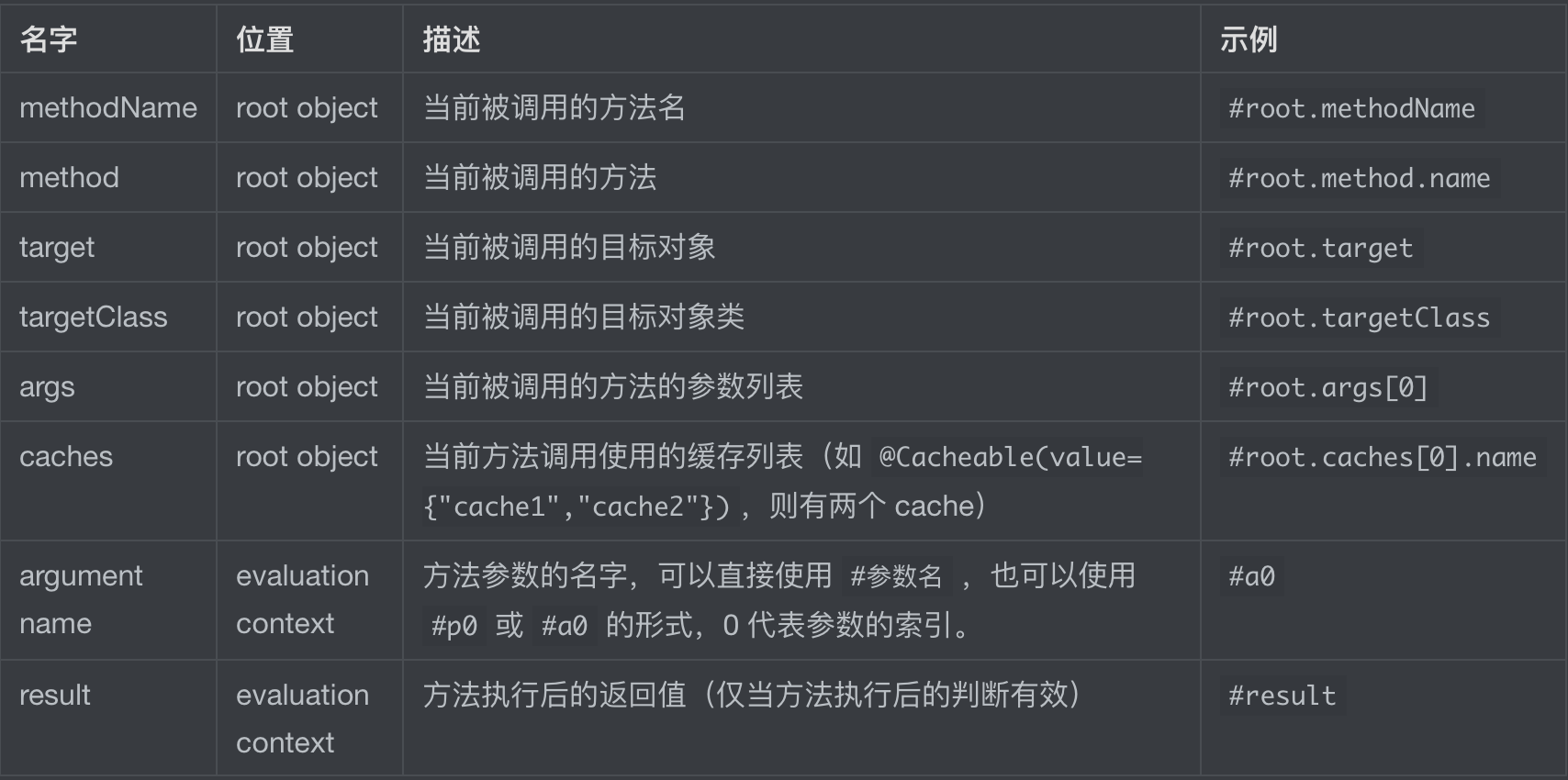
常用spEL表达式:
2.2.1.2、@CacheEvict Annotation indicating that a method (or all methods on a class) triggers a {@link org.springframework.cache.Cache#evict(Object) cache evict} operation.
清除缓存操作,常用参数为:value和key
可以使用spEL
1 @CacheEvict(value = "myJ2CacheRegion", key = "#user.id")
2.2.1.3、@CachePut Annotation indicating that a method (or all methods on a class) triggers a{ @link * org.springframework.cache.Cache#put(Object, Object) cache put} operation.
与@Cacheable 使用方法类似,也是将方法的返回结果放入缓存。
每次执行都只更新缓存,并不会读取缓存。
2.2.2、CacheChannel
2.2.3、CacheManager
org.springframework.cache.CacheManager
spring提供的通用缓存管理SPI
j2cache通过net.oschina.j2cache.cache.support.J2CacheCacheManger实现了CacheManager接口,并在J2CacheSpringCacheAutoConfiguration类中注入spring。
J2CacheCacheManger底层操作的j2cache的CacheChannel
参考 红薯 / J2Cache
罗小爬 / j2cache-demo
SpringBoot 缓存之 @Cacheable 详细介绍 [